There are many reasons why you may not be able to log in with your Precisely User Account.
You have not registered for a Precisely User Account
When trying to log in with your Precisely User Account, you may see this message from the login screen
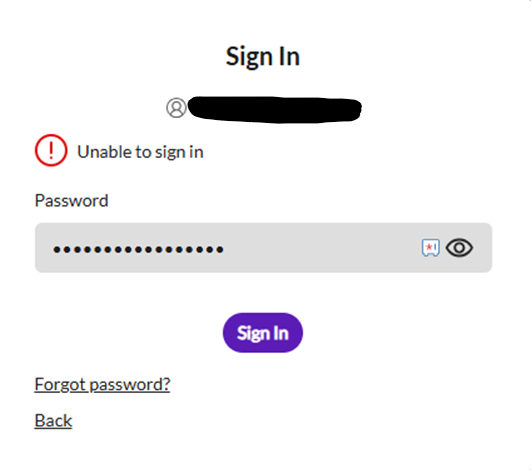
If you have not registered for online access, using the Forgot password function will not send you an email to reset your password. This is because you do not have a Precisely User Account or a password to reset. You can register for a Precisely User Account by following these Knowledge Articles.
Where can I go on the Support website to register for a Precisely User Account?
You can register and log in from
I have registered online, but have not received any emails to complete my registration
If you have registered for online access here and have not received any emails, there are a few reasons.
- Please check your junk/spam folder in case the emails have been moved there.
- You have previously registered for online access and already have a Precisely User Account; therefore, we won't be able to create a new Precisely User Account for you or send emails to complete your registration, as your account already has online access.
- Your IT department may be blocking emails from Precisely. Please check that they are not blocking the emails that will enable you to log in to your Precisely User Account.
I have never set a password for my Precisely User Account after my access was granted
If you have raised a case with Precisely since October 2020, the likelihood is that you have a Precisely User Account. The Precisely Case Owner may have set up your online access. You may have had online access prior to Precisely acquiring your vendor company, and therefore online access was granted when your case data was migrated to Precisely systems, or you may have registered yourself for a Precisely User account.
Precisely will not set up a Precisely User Account for
- Group email addresses
- Non-company email addresses like Gmail, Hotmail, etc
If you have never set a password for your Precisely User Account, this may be why you cannot log in.
To set your password, please go to the relevant Community login page.
Then
- Select Login (For Partners users, the Partner Community takes you directly to the login page)
- Put in your email address
- Select Next
- An email will be sent to you. The email will allow you to set your password (please check your junk/spam folder if it does not appear in your Inbox).
- Once the password is set, you should be able to log in
Emails moved to your Junk / Spam folder rather than your Inbox
Emails may have been sent to you for either Registration, setting your password, or resetting your password, but unfortunately, you haven't received them in your Inbox. Please check your junk/spam folder in case the emails have been moved there.
Your IT Department is blocking emails from Precisely
Your IT department may be blocking emails from Precisely. Please check that they are not blocking the emails that will enable you to log in to your Precisely User Account.
Your organization is using its own SSO to access Precisely web apps
Your organization may have requested to use their own SSO when accessing Precisely Applications. This change also applies to your Precisely User Account when you access any of the Precisely web apps listed on our Login page.
Please make sure that your IT Department has added you to the Active Directory Group that controls online access to Precisely Applications. The easiest way to determine if your company is using its own SSO is to
- Go to one of the Precisely web applications from our login page
- Put in your email address
- Select next
If it now displays your company's login page, your company is using its own SSO for access. As long as your Internal IT Department has granted Access and Precisely has set you up with a Precisely User Account, you can log in with your email address and the password you set within your company.
Undertaking a Password Reset through Precisely will not update your password if you are using your own SSO, as the password you use is your company's.
Your email address has changed, but Precisely is unaware of the change
If you have changed your email address but haven't notified Precisely of the change, your online access could still be linked to your old email address. Precisely can undertake an email address change as long as the email address change is related to the same company ownership. Precisely will not change an email address if you have left one company to work for another.
Single Sign-On Error
After attempting to log in to the Customer or Partner Community, you may see a Single Sign-On (SSO) error asking you to contact your Salesforce admin for help.
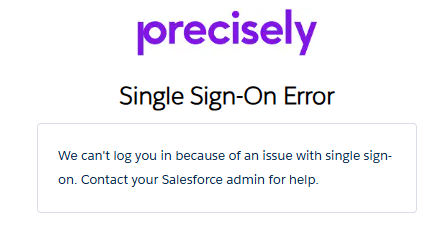
This error message can occur when you attempt to log into the wrong Community. The correct Communities are:
If a Partner tries to log in to the Customer Community or a Customer tries to log in to the Partner Community, the above error will be displayed. Please log in to the correct Community, and this error will not appear.
The error can also appear if you have a Precisely User Account but have never registered for the Customer or Partner Community.
You have a Precisely User Account, but have never registered for the Customer or Partner Community
If you registered for Precisely APIs, Precisely Data Experience on those sites, or have a login to one of our hosted products, then you will not have access to
- Customer Community
- Partner Community (Partners only)
- Ideas Community
- Knowledge Communities
- PreciselyU / Precisely University
And therefore, you would need to register for online access here.
If you registered for the Customer or Partner Community, then you will have access to all the web apps shown on our login page.
Except for the Partner Community, which is only available to Partners.
How do I reset my password?
You can reset your password by following the steps in this knowledge article.
I have tried all of the above and still cannot log in
Please get in touch with Support via the Contact Support page.