This topic is part of a series of articles about the Precisely Customer Community. For the complete list of topics, you can visit: How to Access and Use the Precisely Customer Community.
After you have opened a Case with Precisely (either via the Precisely Customer Community / Precisely Partner Community or by phone), you can check the status of the Case via the Support tab or the My Support Cases tile on the homepage. If a Post is added to a Case you opened, you will receive an email notifying you that your Case has been updated.
To see a list of your Cases, select the Support tab and choose the My Support Case List option or select the My Support cases tile on the homepage.
By default, the view will show My Support Cases. If you are the Primary or Secondary Administrator on your Account and Precisely Customer Support has provided your login with administrative privileges, you can also view My Account’s Cases to access Cases you did not open.

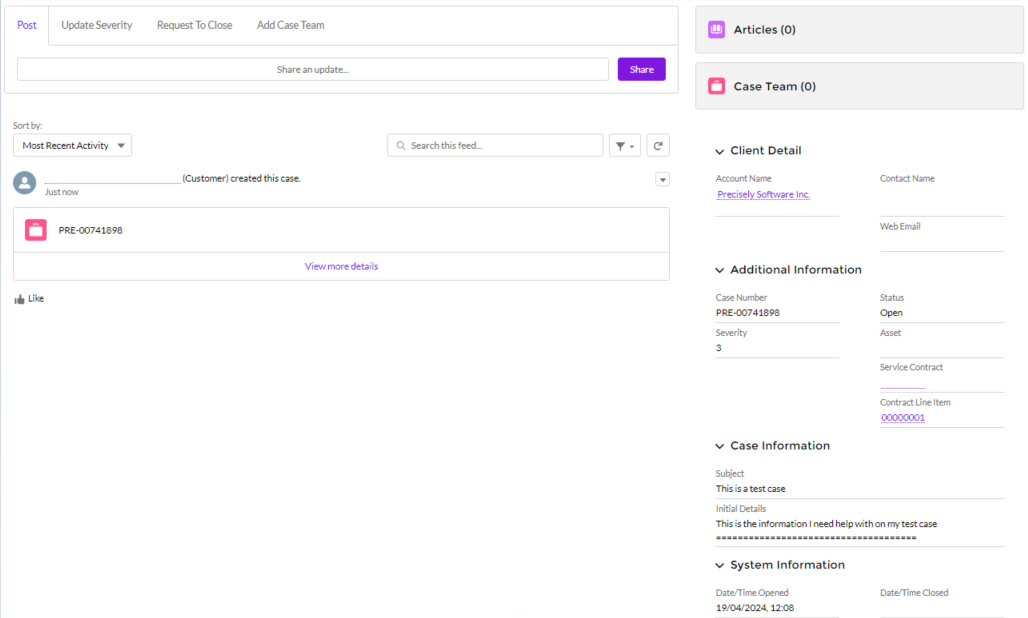
To view more information, select the Case Number. The information displayed on the right side of the Case page (under Client Detail and Additional Information) reflects the Case's initial support details (for example, Severity, Subject, and Description). As a Support Engineer is working on your Case, the Status field (under Additional Information) will be updated to reflect the latest information.
For details on the Case Team feature, please refer to: Add Users to Cases via Case Teams