This topic is part of a series of articles about the Precisely Customer Community. For the complete list of topics, you can visit: How to Access and Use the Precisely Customer Community.
The Case Team feature allows multiple customer and/or partner users to receive notifications on a Precisely Support case. Case update notifications will be sent to all members of the case team. This allows for enhanced collaboration and coverage, ensuring case progress maintains a steady pace to resolution.
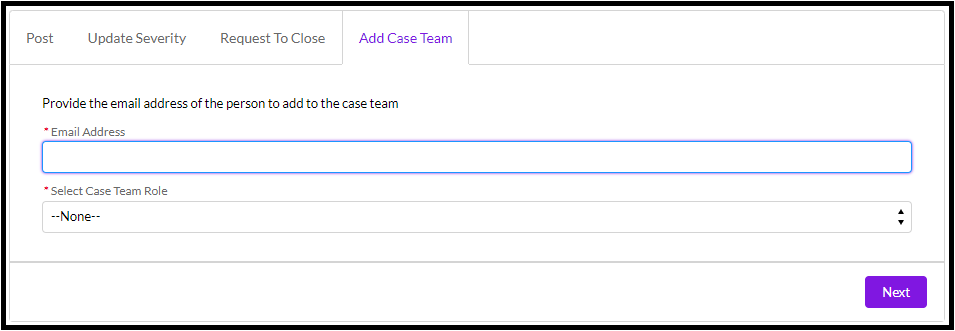
To add an individual to a ticket's case team, complete the fields within the "add case team" tab. The case team may be updated at any time by anyone who can see the case:
The current case team listing is found within each case via "My Support Cases" :

The case team is unique to each case. Removing a case team member must be facilitated through Precisely Support.
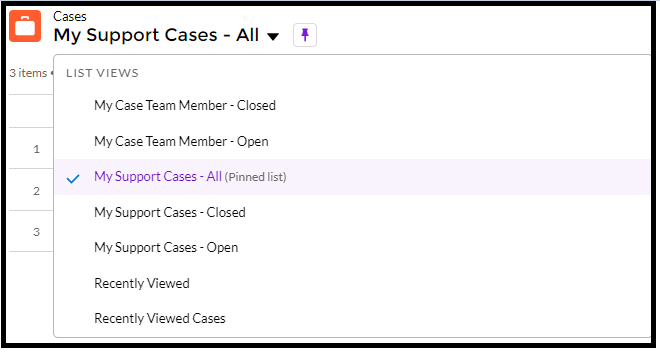
Two new case lists have been added detailing cases with case teams hosting your ID: "My Case Team Member - Closed" and "My Case Team Member - Open" :
Please reach out to Precisely Support with any questions around this feature